
PWA (Progressive Web App)
Flipnem can run in a browser tab or be installed as an app (PWA).
Installing as an App
The Flipnem PWA (Progressive Web App) can be installed on any device. Your browser will enable the install. For example: on Chrome browsers on a Desktop OS there is a small install button in the address bar:
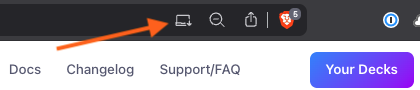
| Platform / Browser | How to install |
|---|---|
| Desktop — Chrome, Edge, Brave | Click the install button in the address bar (shown above) |
| Mac — Safari | File → Add to Dock |
| iPhone / iPad — Safari | Share → Add to Home Screen |
| Android — Chrome, Brave | Browser menu (⋮) → Add to Home screen |
Reasons to use Flipnem as a PWA
- Native UX — installed on the Desktop, available via the application switcher, and running in its own window.
- Protected local storage — when running in a browser, Flipnem's cached data can be evicted whenever the browser decides to reclaim space, a real risk with large media decks. Installing as a PWA removes this concern (see Working Offline).
- Badge notification — on Desktop and iOS platforms, the application icon will reflect the number of reviews that are due.