
Accessibility
Flashcards built to work with VoiceOver on macOS and iOS
Flipnem is tested end-to-end with VoiceOver on both macOS and iOS — you can run a complete spaced-repetition study session, front to back, without touching the screen or a mouse.
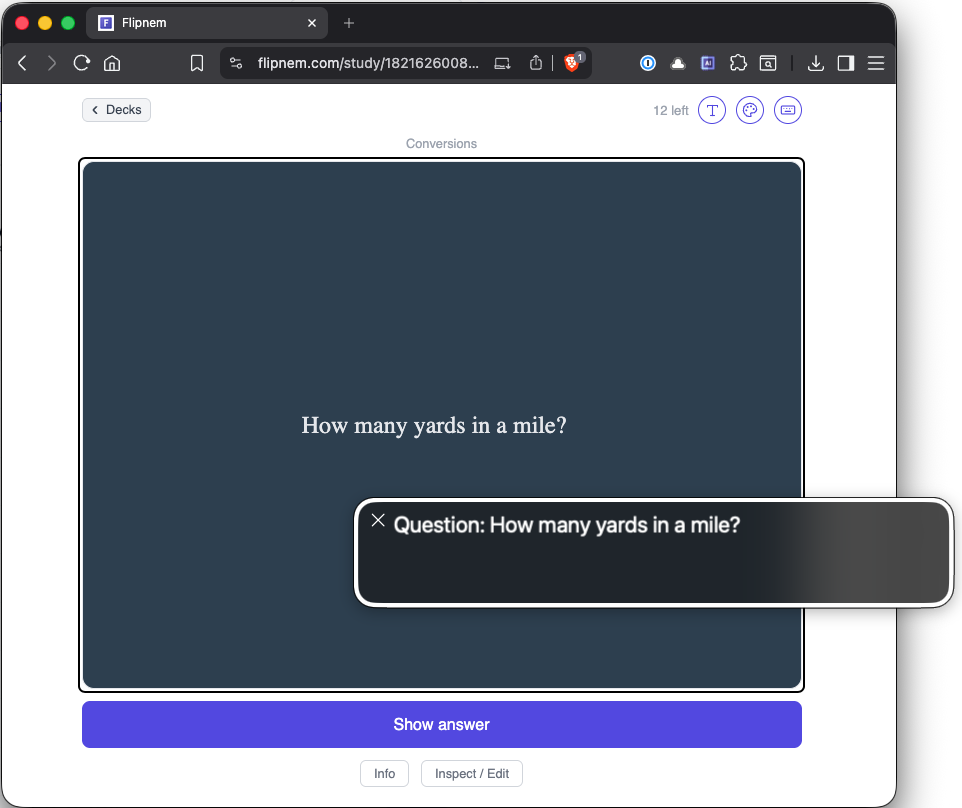
Every card is announced as it's read — captions shown here for clarity
See it in action
A demo study session, read start to finish
This walkthrough runs on macOS VoiceOver in Safari. iOS VoiceOver support is built and tested the same way — an iPhone demo video is on the way.
What's supported
VoiceOver optimized study flow
Designed for how visually impaired users actually move through a page.
- Full study sessions are readable start to finish — the card front, the flip, and your again/hard/good/easy options are all announced automatically.
- Fill-in-the-blank (cloze) cards read the blank as "blank," not silently skipped or read as raw punctuation.
- Every study session opens with focus already on the card — no hunting for where to start.
- A dedicated keyboard shortcut re-reads the current card at any time without losing your place.
- Page and screen changes are announced as you move through the app, so you always know where you landed.
- Deck lists and every actionable row are labeled with real context — "Study Spanish Verbs, 12 due," not just "Study."
- Filtering a deck list down to only cards that are due works like any other control, fully labeled.
Built for low vision too
Not every accommodation needs a screen reader
Low vision, light sensitivity, and reading conditions like dyslexia often call for a different kind of accommodation: a card you can actually see comfortably, not one read aloud. All Flipnem plans support Card Styling. Every deck in Flipnem can be restyled to fit how you read best.
- Font size — scale text up or down per deck, independent of browser zoom, so nothing gets cut off or overlaps.
- Serif vs sans-serif — switch typography to whatever is easiest for you to read.
- Background color — pick a background per deck instead of straining against a stark white or dark screen.
- Set a global default in Settings for every deck, or override it per deck.
- Changes apply live in the study viewer — no need to leave your session to adjust.
Keyboard overrides
Every shortcut can be remapped
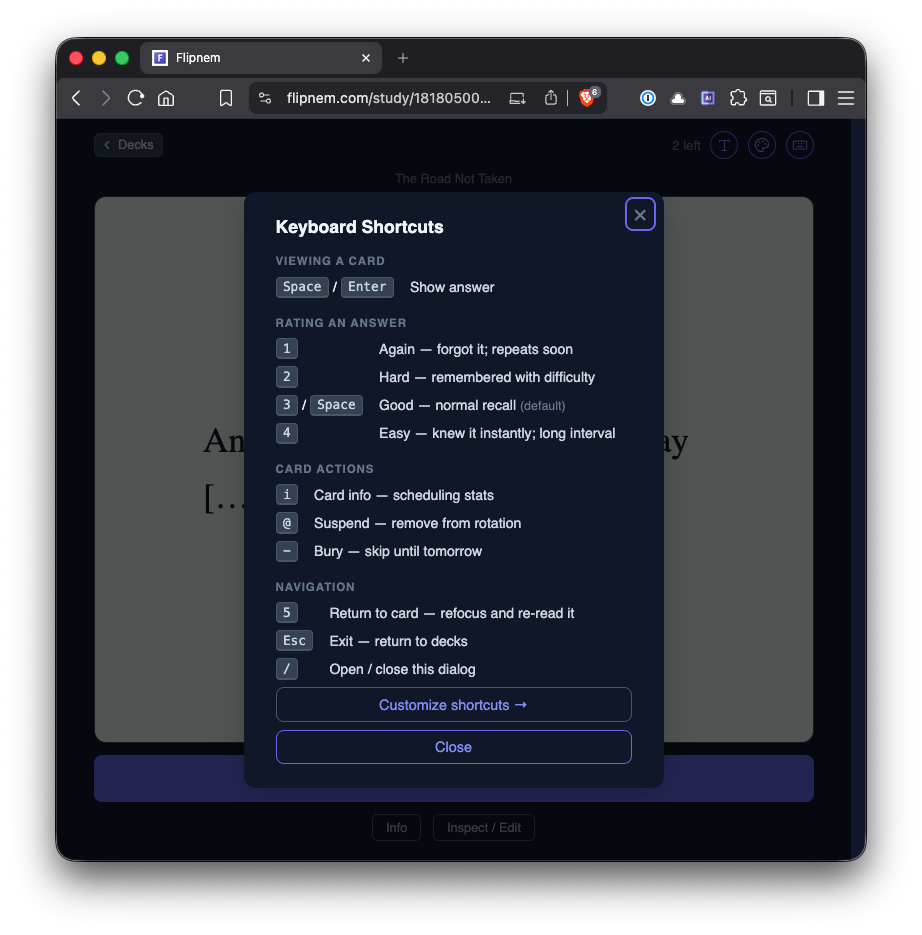
Flipnem ships with sensible defaults for studying hands-free. If VoiceOver or a browser extension already claims one of those keys, open the shortcuts dialog and reassign it to whatever's actually free on your setup.
- Space/ Enter Show answer
- 1/ 2/ 3/ 4 Rate again / hard / good / easy
- 5 Re-read the current card
- / Open this shortcuts dialog
- Esc Exit to decks
FAQ
Common questions
Does Flipnem work with VoiceOver?
Yes. Flipnem is built and tested end-to-end with VoiceOver on both macOS Safari and iOS Safari — study sessions, deck lists, and account pages all work with a screen reader running.
Do I need to change any settings to use a screen reader with Flipnem?
No. There is no separate accessibility mode to turn on. Turn on VoiceOver and Flipnem works the same way it does for a sighted user.
Is accessibility a plugin or bolted on afterward?
No — it's built into the study flow itself: how cards are announced, how focus moves between screens, and how controls are labeled.
What if my keyboard shortcuts extension intercepts VoiceOver keys?
Some web extensions (and even VoiceOver itself) can conflict with Flipnem's default key mappings. Every shortcut can be remapped from the keyboard shortcuts dialog, so just assign a key that's free on your setup.
Are other screen readers like NVDA or TalkBack supported?
VoiceOver on macOS and iOS is what we've built against and tested directly. Flipnem uses standard semantic HTML and ARIA, so other screen readers should work reasonably well, but we haven't verified them the same way.
Get started
Study your way, with the tools you already use
Free to start — every new account gets a 15-day Scholar trial, no card required.