
Deck Sharing
Share flashcard decks with anyone, one link at a time
Teach a class, study with friends, or hand off a deck you built to your team. Generate a shareable link from any deck — recipients get a full copy with one click.
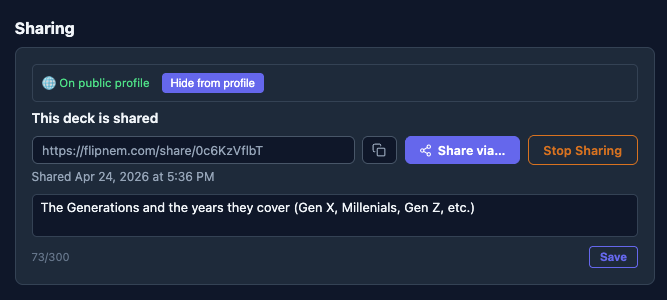
One link — recipients get their own full copy
How it works
Three steps, no file handling
Scholar creates a share link
One click from your deck library exports a snapshot and generates a shareable URL.
Send it to anyone
Paste the link anywhere — a group chat, an email, a class forum. Anyone with a free Learner account can accept it.
Recipient claims it instantly
They click Accept, the deck lands in their library — images, audio, and all. Ready to study instantly.
What's included
Built to just work for everyone involved
- Works for any plan — anyone can receive a shared deck, even on the free Learner tier
- Point-in-time snapshot — your original deck keeps evolving, unaffected by what you shared
- Media included — images, audio, and video travel with the deck automatically
- Revoke anytime — Scholar can pull a share down to free up storage; anyone who already accepted keeps their copy
FAQ
Common questions
Do I need a paid plan to share a deck?
Creating a share link requires Scholar. Anyone can accept one, including free Learner accounts.
What exactly does the recipient get?
A full copy of the deck as it existed when you shared it — cards, images, audio, and all — added straight to their library.
Will the recipient's copy update if I keep editing my deck?
No. A share is a point-in-time snapshot, so recipients get an independent copy that doesn't change when you edit the original.
Can I delete a deck I've shared without impacting a recipient?
Yes — revoke the share link anytime from your deck library. Anyone who already accepted keeps their copy; the link itself just stops working for new recipients.
Get started
Share your first deck in minutes
Free to start — every new account gets a 15-day Scholar trial, no card required.