Anki on iPhone & iPad
Anki for iPhone and iPad: study your decks free
The official Anki app for iPhone and iPad, AnkiMobile, costs $24.99. If you’d rather
not pay up front, keep building decks in Anki on your computer and import the .apkg into Flipnem. Your progress comes with it: due dates, FSRS memory
state and review history. Study in Safari or from your home screen. The free plan holds
3 top-level decks and 1,000 cards.
Your options
Three ways to use Anki on iPhone and iPad
There’s no free version of the official Anki app on iOS. Here’s what you can use instead, and what each one is good at.
Side by side
Flipnem vs AnkiMobile on iPhone and iPad
Both use FSRS and both show the next interval on every answer button. The difference is where your decks live, what you pay and how much you can do on the phone itself.
| Feature | Flipnem | AnkiMobile |
|---|---|---|
| Price | Free up to 3 top-level decks and 1,000 cards; Scholar $1/month or $10/year | $24.99 one-time (US App Store); sync through AnkiWeb is free |
| How you get it | Open flipnem.com in Safari, or add it to your home screen | App Store download |
| Deck list | One slim row per deck with a single due count; subdecks fold under their parent | Card-style rows with Total, New, Learning and To Review counts; a Compact display mode in Settings |
| Study screen | Again, Hard, Good, Easy, each showing its next interval; keyboard shortcuts on iPad and computers | Again, Hard, Good, Easy with intervals, plus tap zones, gestures and a drawing whiteboard |
| Scheduler | FSRS, on by default | FSRS or SM-2, set in deck options |
| Card browser | No full browser by design; Inspect a deck to edit notes, tags and suspended cards | Full Browse screen with search across your collection |
| Card types | Basic, cloze and most standard note types; no JavaScript templates or Image Occlusion | All Anki note types, including Image Occlusion |
| Offline study | Yes, when added to your home screen | Yes |
| Syncs with Anki desktop | No; you import an .apkg | Yes, through AnkiWeb |
| Other devices | Same account in any browser: Android, Chromebook, Mac, Windows | iPhone and iPad; other platforms use the other Anki apps |
AnkiMobile details checked on November 21, 2026 against its US App Store listing, the AnkiMobile manual.
The deck list
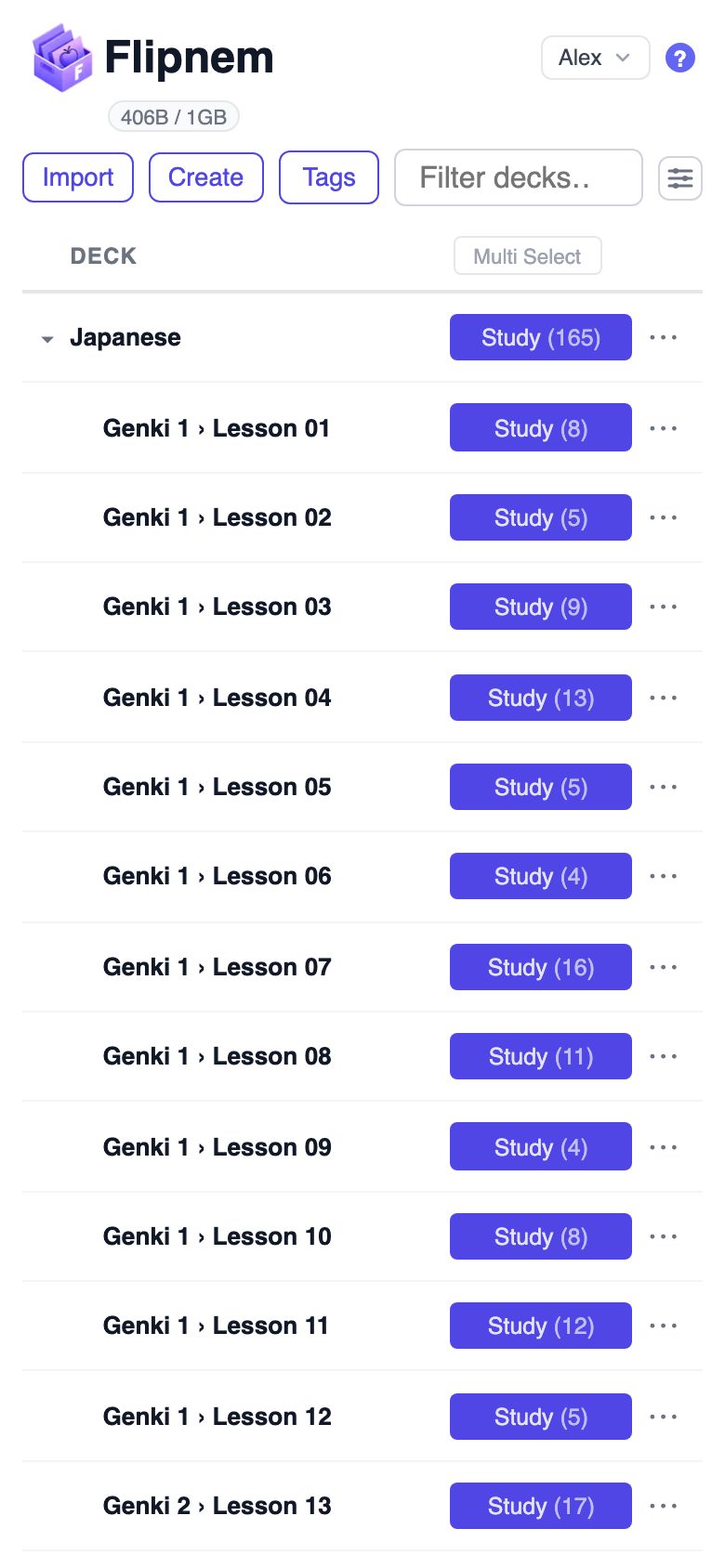
We loaded a test account with 34 subdecks under two parents, the way a Japanese course or a USMLE deck is usually split up, and opened it on a 390 × 844 iPhone screen. 14 deck rows fit on one screen in Flipnem; in Safari, with its toolbar showing, a few fewer.
Each row shows one number, the cards due today, on its Study button. Parents fold their subdecks away until you tap the arrow, so a long course takes one row until you need it.
The study screen
Tap to reveal, then Again, Hard, Good or Easy, with the next interval on each button. Images, audio and cloze cards come across with your deck’s own styling, and you can fix a typo from the study screen with Inspect / Edit.
AnkiMobile’s study screen offers more: tap zones, swipe gestures and a whiteboard for writing kanji or drawing pathways. If you rely on those, they’re a good reason to stay.
AnkiMobile is the better fit if…
You want your iPhone to stay in two-way sync with Anki desktop, you use Image Occlusion or custom JavaScript templates, or you edit and search your whole collection from the phone.
Flipnem is the better fit if…
You build decks on a computer and mostly review on your phone, you don’t want to pay $24.99 before you know you’ll stick with it, or you want the same study screen on an Android phone, a Chromebook or a school laptop too.
How it works
Curate in Anki, study in Flipnem
Anki desktop is a superb workbench: the Browse window, find and replace, add-ons. Use it to build and clean up a deck, then bring the finished deck to Flipnem to study.
-
Export the deck
Anki desktop: File → Export, choose Anki Deck Package (
.apkg), pick the deck and tick Include media. Tick Include scheduling information to keep due dates.AnkiMobile: swipe left on the deck in the deck list, tap Export, then save the file to Files or AirDrop it.
-
Import it on your iPhone or iPad
Open flipnem.com in Safari, sign up free, tap Import and choose the
.apkgfrom Files. Untick Reset scheduling if you exported your schedule. -
Add it to your home screen
In Safari on iPhone or iPad, tap Share → Add to Home Screen. Flipnem opens full screen with its own icon and works offline.
Small fixes happen in Flipnem
- Fix a typo straight from the study screen
- Filter a deck’s notes and edit any field
- Add and remove tags
- Suspend, bury or restore cards
Big changes belong in Anki
- Flipnem has no full card browser, on purpose
- No find and replace across a collection
- No add-ons
- Re-importing a deck replaces it, Flipnem progress included
That last point matters. Importing isn’t a sync: once a deck is in Flipnem and you’ve been studying it, importing a newer version of the same deck starts it over. So do the heavy curation before you import, and bring new material in as its own deck.
Your progress
Your Anki progress comes with you
Untick Reset scheduling when you import, and Flipnem picks up each card where Anki left it. We tested this with a deck exported from an FSRS collection, with review, learning, suspended and new cards and their review log.
Comes across
- Each card’s due date, on the same day as in Anki
- Intervals, and whether a card is new, learning or in review
- FSRS memory state (stability and difficulty)
- Suspended cards, review and lapse counts
- Your review history, in Flipnem’s activity charts
Doesn’t come across
- FSRS parameters you optimized in Anki; Flipnem uses its defaults
- Your desired retention setting; Flipnem aims for 90%
In practice, a well-learned card stays well-learned: answer Good on a card Anki had at a 200-day interval and Flipnem schedules it well over a year out. Cards Anki scheduled with the older SM-2 algorithm have no memory state to copy, so Flipnem estimates one from each card’s interval and ease and refines it as you review. Because Flipnem uses its default FSRS parameters rather than ones optimized on your history, intervals can differ a little from Anki’s.
Importing a shared deck you haven’t studied yet? Leave Reset scheduling ticked so every card starts fresh. More in the import guide.
Pricing
Start free, upgrade only for big collections
Learner is free with no card required: up to 3 top-level decks (with as
many subdecks as you like), 1,000 cards and 250 MB of media, with FSRS, .apkg import and offline study on your home screen.
Scholar is $1 a month or $10 a year for unlimited decks and cards, 1 GB
of media and .apkg export back to Anki. New accounts get a 15-day Scholar
trial. AnkiMobile is $24.99 once, and if you end up preferring it, that’s money well spent.
Full details: plans and limits.
FAQ
Anki on iPhone and iPad: questions
Is there an Anki app for iPhone?
Yes. AnkiMobile is the official Anki app for iPhone and iPad, made by Anki’s developer. It costs $24.99 once on the US App Store and syncs with Anki desktop through free AnkiWeb sync.
Is Anki free on iPhone?
Anki desktop, AnkiDroid and AnkiWeb are free, but AnkiMobile, the iPhone and iPad app, is a one-time $24.99. Free options on iPhone are AnkiWeb in Safari, which reviews a collection you already sync from an Anki app but can’t import decks, and Flipnem, which imports .apkg files in Safari and studies them with FSRS on its free plan (up to 3 top-level decks and 1,000 cards).
Can I use Anki on iPad?
Yes. AnkiMobile is a single purchase that runs on both iPhone and iPad. Flipnem also works on iPad in Safari or from the home screen, with keyboard shortcuts if you use a keyboard, on the same account as your iPhone.
Can I use my AnkiMobile or Anki desktop decks in Flipnem?
Yes. Export a deck as an .apkg file (in AnkiMobile, swipe left on the deck and tap Export; in Anki desktop, File → Export), then open Import Deck in Flipnem and pick the file. Images, audio and subdecks come across.
Does Flipnem sync with AnkiMobile or Anki desktop?
No. Importing is a one-time copy. Reviews you do in Flipnem stay in Flipnem, and importing a newer version of a deck you already have replaces it, including its Flipnem progress. Do your big edits in Anki before you import.
Will my review history and intervals come across?
Yes, if you untick “Reset scheduling” on import. Each card keeps its due date, interval, state, suspended status and FSRS memory state, and your review history shows up in Flipnem’s activity charts. Cards Anki scheduled with SM-2 get a memory state estimated from their interval and ease. FSRS parameters you optimized in Anki don’t come across; Flipnem uses its own defaults.
Does Flipnem have a card browser like Anki?
Not a full one, on purpose. Flipnem is built for studying. Each deck has an Inspect page where you can filter notes, fix a field, change tags and suspend or bury cards. For bulk edits, find-and-replace or add-ons, Anki desktop is the better tool.
Does Flipnem work offline on iPhone?
Yes, once you add it to your home screen from Safari’s Share menu. Your decks are kept on the phone, and reviews you do offline sync when you reconnect.
Is Flipnem made by the Anki developers?
No. Flipnem is independent and not affiliated with Anki, AnkiMobile or Ankitects. It reads the standard .apkg format. Buying AnkiMobile funds Anki’s development, and if it suits you, it’s a good app to support.
More comparisons: studying Anki decks online (Flipnem vs AnkiWeb), Flipnem vs Anki and other alternatives, and Anki vs Quizlet.
Get started
Put your Anki decks on your iPhone or iPad
Make a free account in Safari on your iPhone or iPad, import your .apkg, and add Flipnem to your home screen.